

Chat
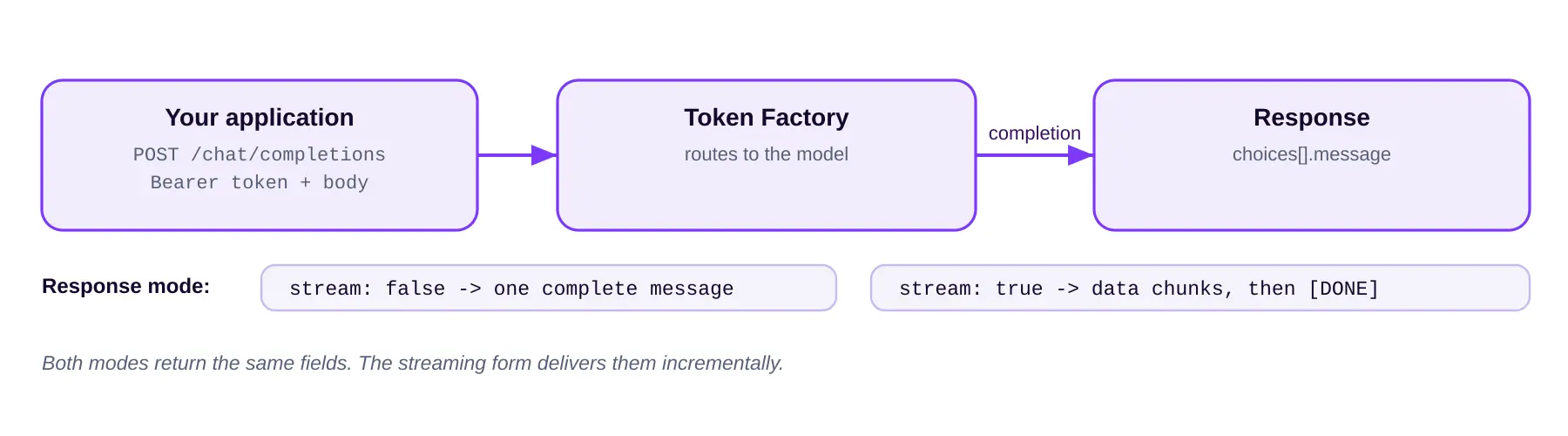
Send a chat conversation to a model and receive a completion. Supports both streaming and non-streaming modes.
| Method and endpoint | POST {API_URL}/chat/completions |
|---|---|
| Base URL (API_URL) | https://gpu-api.exascalelabs.ai/api/v1 |
| Authentication | Bearer access token with refresh-token, or a Bearer API token |
| Modes | Streaming and non-streaming |
HTTP Request
POST {API_URL}/chat/completions
Body parameters
| Parameters | Requirements | Type | Description |
|---|---|---|---|
model | Required | string | The name of the model you wish to use. Use the model_name value from the model list |
stream | Required | string | Set to true to return the response as a stream of data chunks as they are generated. Set to false to receive a single complete message once generation is finished. |
messages | Optional | array of objects | List of messages for the conversation. A sequence of message objects representing user and system dialogue history. Each message must include a role and content field. |
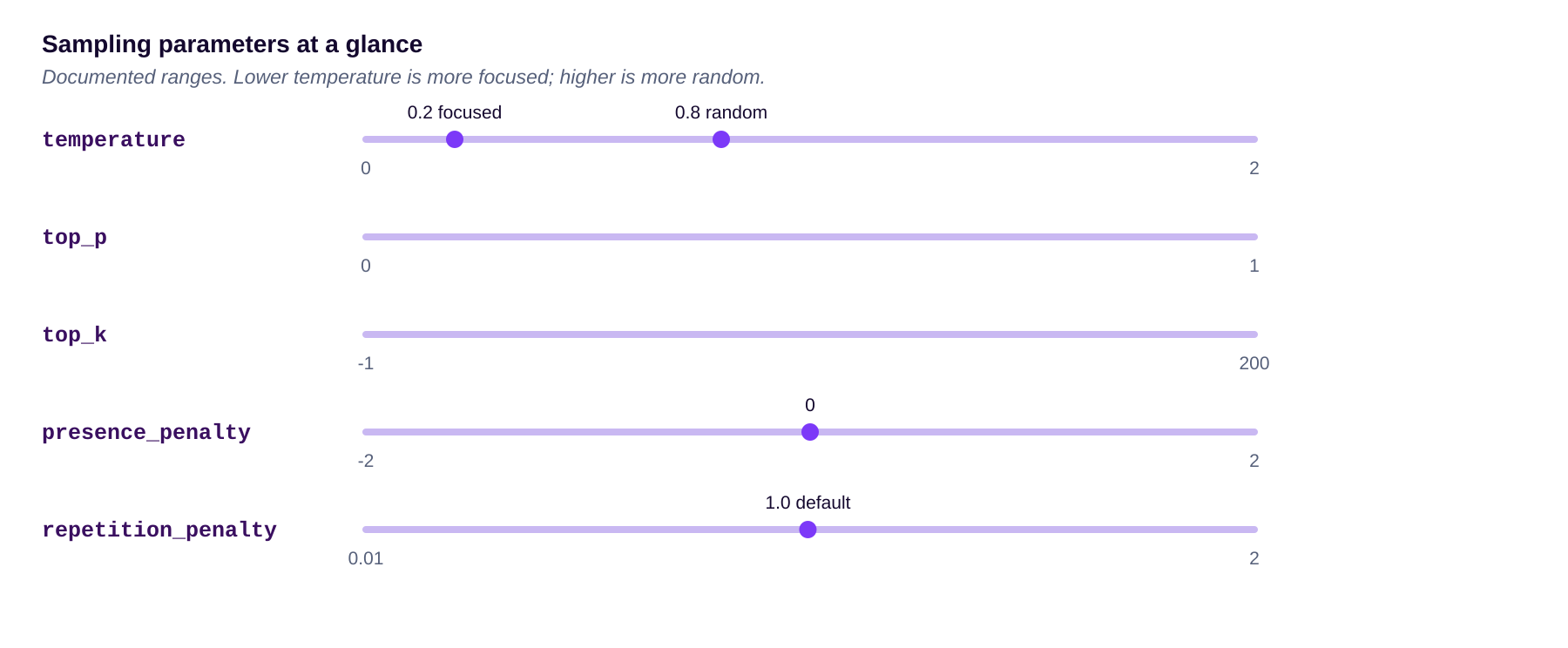
temperature | Optional | float | Sampling temperature between 0 and 2. Higher values like 0.8 make the output more random. Lower values like 0.2 make it more focused and deterministic. |
top_p | Optional | float | Nucleus sampling. The model considers the tokens with top_p probability mass. 0.1 means only the tokens comprising the top 10% probability mass are considered. Minimum 0, maximum 1. |
top_k | Optional | integer | The model considers only the top_k most probable tokens. 50 means only the 50 most likely tokens are considered. minimum: -1, maximum:200 |
presence_penalty | Optional | float | Number between -2.0 and 2.0. Positive values penalize tokens that already appear in the text, increasing the model’s likelihood to talk about new topics. minimum: -2, maximum:2 |
repetition_penalty | Optional | float | Penalizes repeated tokens in the model’s output. Higher values reduce the likelihood of repeating the same phrases. Default: 1.0. minimum: 0.01, maximum:2 |
max_tokens | Optional | integer | The maximum number of tokens to generate in the completion. The token count of your prompt plus max_tokens cannot exceed the model’s context length. |
Response Attributes
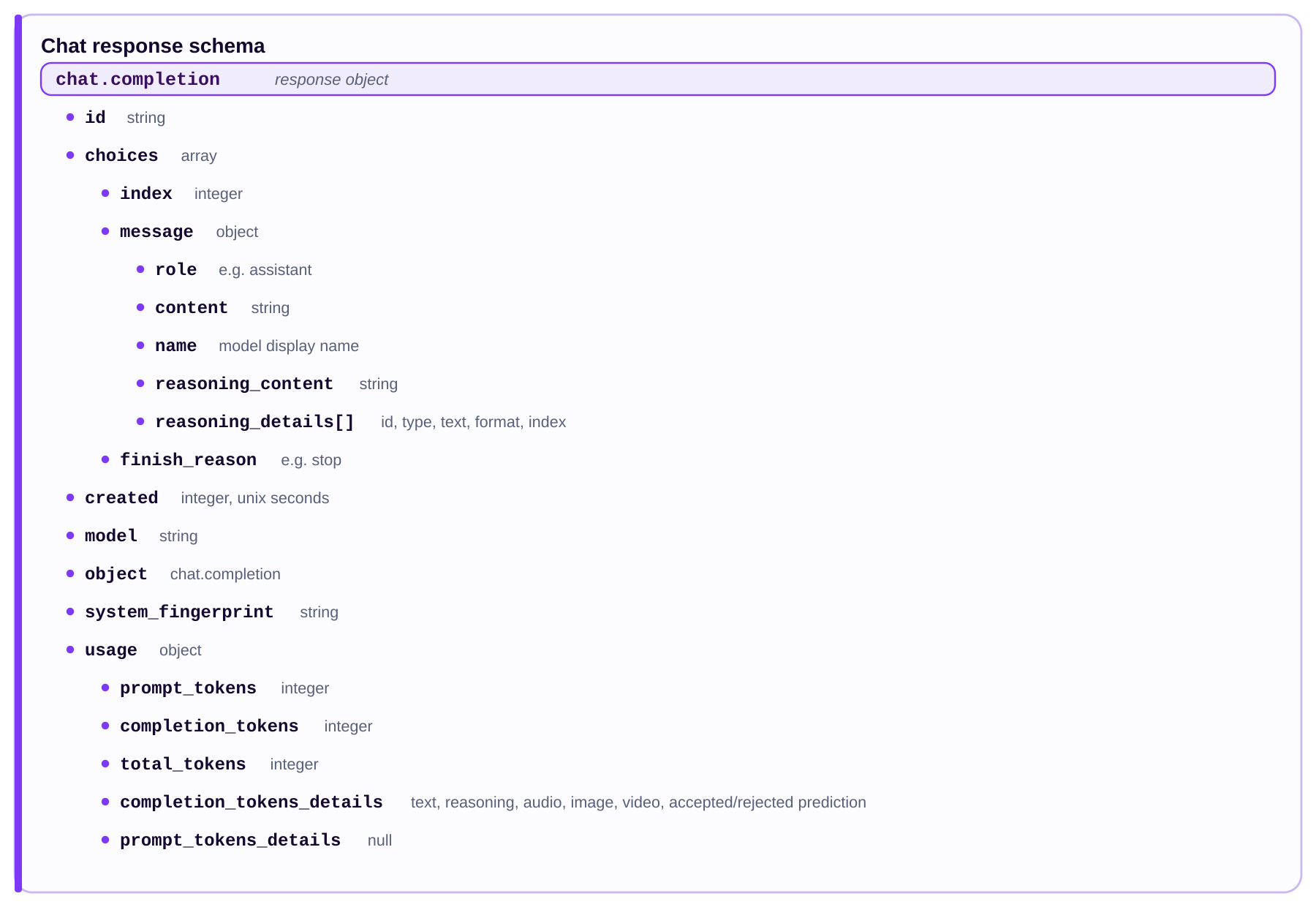
Represents a chat completion response returned by the model, based on the provided input. The top-level fields are:
| Field | Type | Description |
|---|---|---|
id | string | A unique identifier for the chat completion response. |
choices | array | An array of choices returned by the model, each representing a possible completion. |
created | integer | The timestamp (seconds since the Unix epoch) when the response was created. |
model | string | The name of the model that generated the response. |
object | string | The type of object returned, which is chat.completion for chat completion responses. |
system_fingerprint | string | A fingerprint of the system environment where the model is running, useful for debugging and optimization. |
usage | object | Token usage information for the response. |
The choices array
Each item in choices represents a possible completion and contains the following properties:
| Property | Description |
|---|---|
index | The index of the choice in the returned array. |
message | An object containing the generated message from the model. See the message object below. |
finish_reason | The reason the model finished generating the response (for example, stop). |
The message object
Each message object includes the following properties:
| Property | Description |
|---|---|
role | The role of the message sender (for example, assistant). |
content | The content of the generated message. |
name | The display name of the model that generated the response. |
reasoning_content | The reasoning content that the model used to generate the response. |
reasoning_details | An array of objects providing detailed reasoning information. See the reasoning_details objects below. |
reasoning_details objects
Each entry in reasoning_details includes the following properties:
| Property | Description |
|---|---|
id | A unique identifier for the reasoning detail. |
type | The type of reasoning detail (for example, reasoning.text). |
text | The text content of the reasoning detail. |
format | The format of the reasoning detail (for example, openai-responses-v1). |
index | The index of the reasoning detail in the returned array. |
The usage object
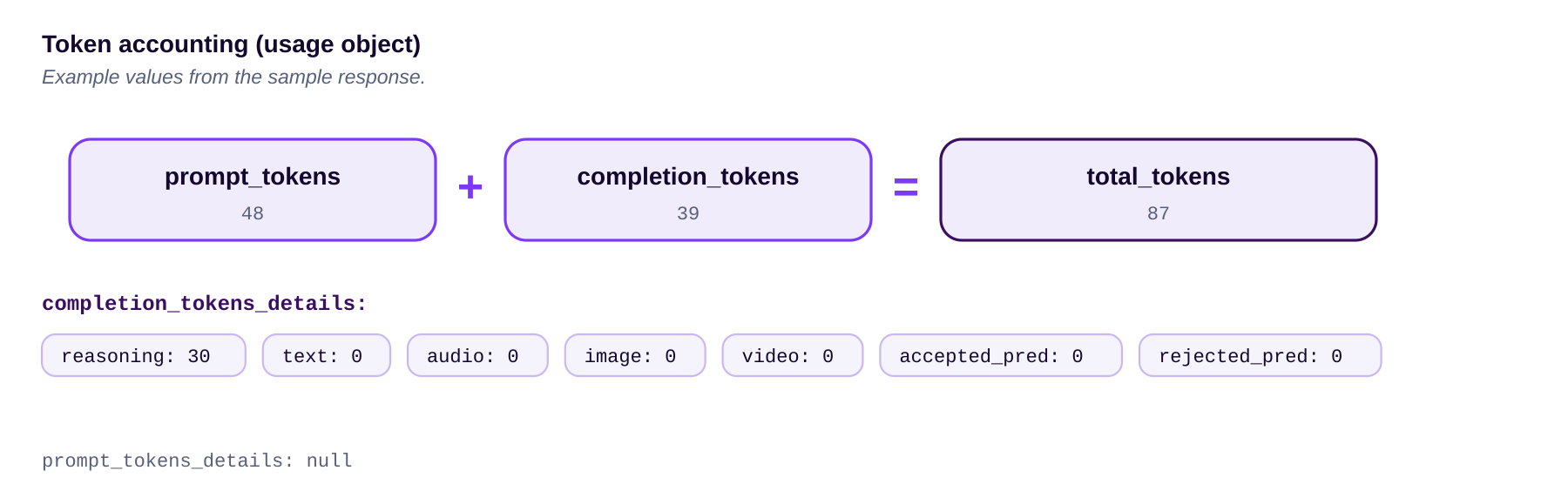
The usage object contains information about the token usage for the response:
| Property | Description |
|---|---|
prompt_tokens | The number of tokens in the input prompt. |
completion_tokens | The number of tokens in the generated completion. |
total_tokens | The total number of tokens used (prompt + completion). |
completion_tokens_details | An object providing detailed information about the types of tokens used in the completion. See the completion_tokens_details object below. |
prompt_tokens_details | An object providing detailed information about the types of tokens used in the input prompt. Currently null, but may include fields similar to completion_tokens_details in the future. |
completion_tokens_details object
| Property | Description |
|---|---|
text_tokens | The number of text tokens generated. |
reasoning_tokens | The number of reasoning tokens generated. |
audio_tokens | The number of audio tokens generated. |
image_tokens | The number of image tokens generated. |
video_tokens | The number of video tokens generated. |
accepted_prediction_tokens | The number of accepted prediction tokens generated. |
rejected_prediction_tokens | The number of rejected prediction tokens generated. |
Example
Request
curl -X POST '{API_URL}/chat/completions' \
-H 'Authorization: Bearer {ACCESS_TOKEN}' \
-H 'refresh-token: {REFRESH_TOKEN}' \
-H 'Content-Type: application/json' \
-d '{
    "messages": [
        {
            "role": "developer",
            "content": "You are a helpful assistant."
        },
        {
            "role": "user",
            "content": "hello"
        }
    ],
    "model": "MiniMaxAI/MiniMax-M2.1"
}'
Or, if you are using an API token:
curl -X POST '{API_URL}/chat/completions' \
-H 'Authorization: Bearer {API_TOKEN}' \
-H 'Content-Type: application/json' \
-d '{
    "messages": [
        {
            "role": "developer",
            "content": "You are a helpful assistant."
        },
        {
            "role": "user",
            "content": "hello"
        }
    ],
    "model": "MiniMaxAI/MiniMax-M2.1"
}'
Response
Below is an example of a non-streaming response. The actual content and structure may vary based on the model used and the input provided.
{
    "choices": [
        {
            "finish_reason": "stop",
            "index": 0,
            "message": {
                "content": "Hello! How can I help you today?",
                "name": "MiniMax AI",
                "reasoning_content": "The user has sent a simple greeting \"hello\". I should respond in a friendly and helpful manner, introducing myself and offering assistance.",
                "reasoning_details": [
                    {
                        "format": "openai-responses-v1",
                        "id": "reasoning-text-1",
                        "index": 0,
                        "text": "The user has sent a simple greeting \"hello\". I should respond in a friendly and helpful manner, introducing myself and offering assistance.",
                        "type": "reasoning.text"
                    }
                ],
                "role": "assistant"
            }
        }
    ],
    "created": 1780986485,
    "id": "1fddec966dacea7a7b9ec380684e201f",
    "model": "minimax/minimax-m2.1",
    "object": "chat.completion",
    "system_fingerprint": "",
    "usage": {
        "completion_tokens": 39,
        "completion_tokens_details": {
            "accepted_prediction_tokens": 0,
            "audio_tokens": 0,
            "image_tokens": 0,
            "reasoning_tokens": 30,
            "rejected_prediction_tokens": 0,
            "text_tokens": 0,
            "video_tokens": 0
        },
        "prompt_tokens": 48,
        "prompt_tokens_details": null,
        "total_tokens": 87
    }
}
Streaming responses
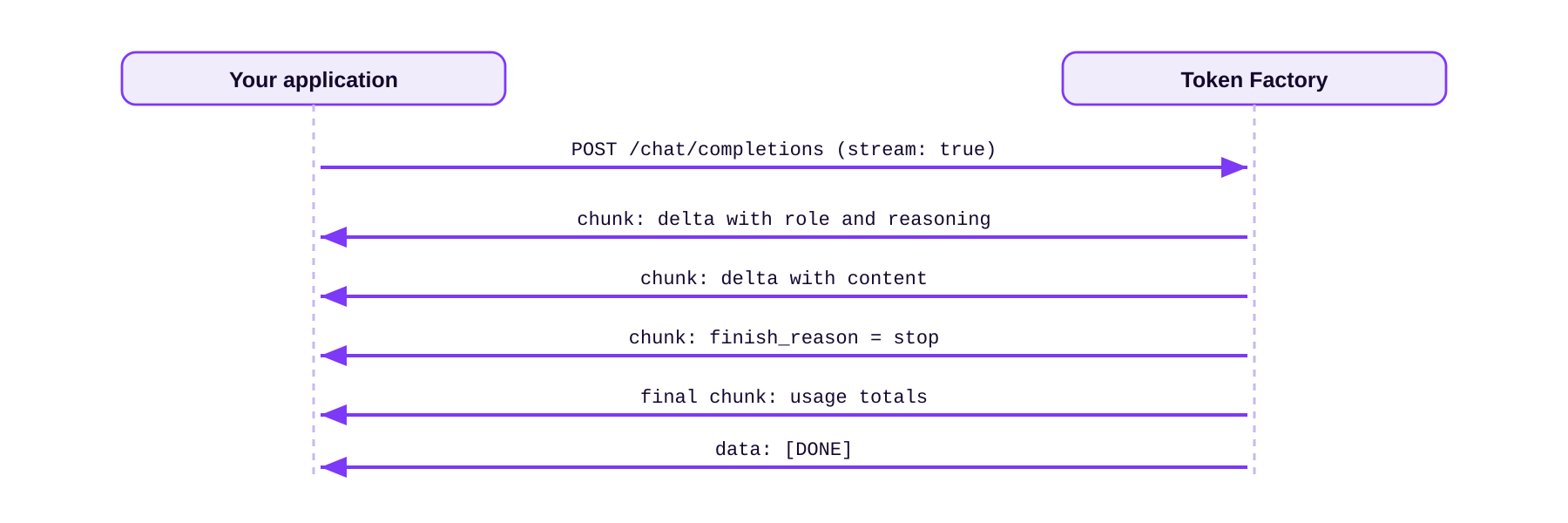
When stream is set to true, the response uses the same structure and arrives as a sequence of data chunks generated by the model. Each chunk carries a portion of the generated content and may include intermediate reasoning details. The final chunk reports usage, and the stream ends with a data: [DONE] line.
| Non-streaming response | Streaming response | |
|---|---|---|
| stream | false | true |
| Delivery | One complete message | A sequence of data chunks |
| Fields | Full object at once | Same fields, sent incrementally. |
| End signal | Response body ends | data: [DONE] |
data: {"id": "36aad562c9a1a49e7d6d662dd113ebe5", "object": "chat.completion.chunk", "created": 1780988986, "model": "minimax/minimax-m2.1", "choices": [{"index": 0, "delta": {"role": "assistant", "reasoning_content": "\nThe user", "reasoning_details": [{"type": "reasoning.text", "text": "\nThe user", "id": "reasoning-text-1", "format": "openai-responses-v1", "index": 0}]}, "finish_reason": null}], "system_fingerprint": "", "sla_metrics": {"ttft_ms": 706, "ts_us": 1780988987393892}}

data: {"id": "36aad562c9a1a49e7d6d662dd113ebe5", "object": "chat.completion.chunk", "created": 1780988986, "model": "minimax/minimax-m2.1", "choices": [{"index": 0, "delta": {"role": "assistant", "reasoning_content": " has simply said \"hello\". This is a greeting, so I should respond in a friendly and welcoming manner.\n"}, "finish_reason": "stop"}], "system_fingerprint": "", "sla_metrics": {"ttft_ms": 706, "ts_us": 1780988987810334}}

data: {"id": "36aad562c9a1a49e7d6d662dd113ebe5", "object": "chat.completion.chunk", "created": 1780988986, "model": "minimax/minimax-m2.1", "choices": [{"index": 0, "delta": {"content": "\n\nHello! How can I help you today?", "role": "assistant"}, "finish_reason": "stop"}], "system_fingerprint": "", "sla_metrics": {"ttft_ms": 706, "ts_us": 1780988987810448}}

data: {"id": "36aad562c9a1a49e7d6d662dd113ebe5", "object": "chat.completion.chunk", "created": 1780988986, "model": "minimax/minimax-m2.1", "choices": [], "system_fingerprint": "", "usage": {"prompt_tokens": 48, "completion_tokens": 37, "total_tokens": 85, "prompt_tokens_details": null, "completion_tokens_details": {"audio_tokens": 0, "reasoning_tokens": 27, "accepted_prediction_tokens": 0, "rejected_prediction_tokens": 0, "text_tokens": 0, "image_tokens": 0, "video_tokens": 0}}, "sla_metrics": {"ttft_ms": 706, "ts_us": 1780988987817961}}

data: [DONE]
Notes
- Send the API token (or an access token with refresh-token) as a Bearer credential in the
Authorizationheader. - Set
modelto amodel_namereturned by themodelsendpoint. - The
usagetoken counts are the basis for billing.
Code examples
The same request in Python and Node. Because the API is OpenAI-compatible, you can also use an official OpenAI SDK by pointing it at the base URL.
Python (requests)
import requests

resp = requests.post(
    "https://gpu-api.exascalelabs.ai/api/v1/chat/completions",
    headers={"Authorization": "Bearer YOUR_EXASCALE_API_TOKEN"},
    json={
        "model": "MiniMaxAI/MiniMax-M2.1",
        "stream": False,
        "messages": [
            {"role": "developer", "content": "You are a helpful assistant."},
            {"role": "user", "content": "hello"},
        ],
    },
)
print(resp.json()["choices"][0]["message"]["content"])
Node (fetch)
const res = await fetch(
    "https://gpu-api.exascalelabs.ai/api/v1/chat/completions",
    {
        method: "POST",
        headers: {
            Authorization: "Bearer YOUR_EXASCALE_API_TOKEN",
            "Content-Type": "application/json",
        },
        body: JSON.stringify({
            model: "MiniMaxAI/MiniMax-M2.1",
            stream: false,
            messages: [
                { role: "developer", content: "You are a helpful assistant." },
                { role: "user", content: "hello" },
            ],
        }),
    },
);
const data = await res.json();
console.log(data.choices[0].message.content);
OpenAI SDK (Python)
from openai import OpenAI

client = OpenAI(
    base_url="https://gpu-api.exascalelabs.ai/api/v1",
    api_key="YOUR_EXASCALE_API_TOKEN",
)
completion = client.chat.completions.create(
    model="MiniMaxAI/MiniMax-M2.1",
    messages=[{"role": "user", "content": "hello"}],
)
print(completion.choices[0].message.content)
OPENAI SDK USAGE
The SDK approach works because the endpoint follows the OpenAI API style. Treat it as compatibility-based usage and confirm any SDK-specific behavior against the documented REST contract above.
Errors and status codes
PLACEHOLDER
This section is a placeholder. The specific HTTP status codes and the full error response body for chat requests are not yet documented here. Confirm them with the Exascale team, then complete the table.
| HTTP Status | Meaning | Notes |
|---|---|---|
| 200 | Request succeeded | Returns a chat.completion object, or a steam of chunks when stream is set to true. |
| TBD | To be confirmed | To be supplied by Exascale. |
Rate limits
PLACEHOLDER
Rate limits for this endpoint are not yet documented here. Confirm the request and token limits with the Exascale team, then complete this section.
Spending can be capped per API token using the credit limit and reset interval set when the token is created. Each user can hold up to 10 API tokens. The usage token counts returned with each response are the basis for billing.
Sources
This reference is taken from the official Exascale Cloud API documentation.